
A terminal application with tabs, split panes, and saved Spaces. Keep your projects organized and reconnect to sessions while they keep running.
Built by Moonbase2090 · Rust, MSRV 1.90 · Linux, macOS & Windows
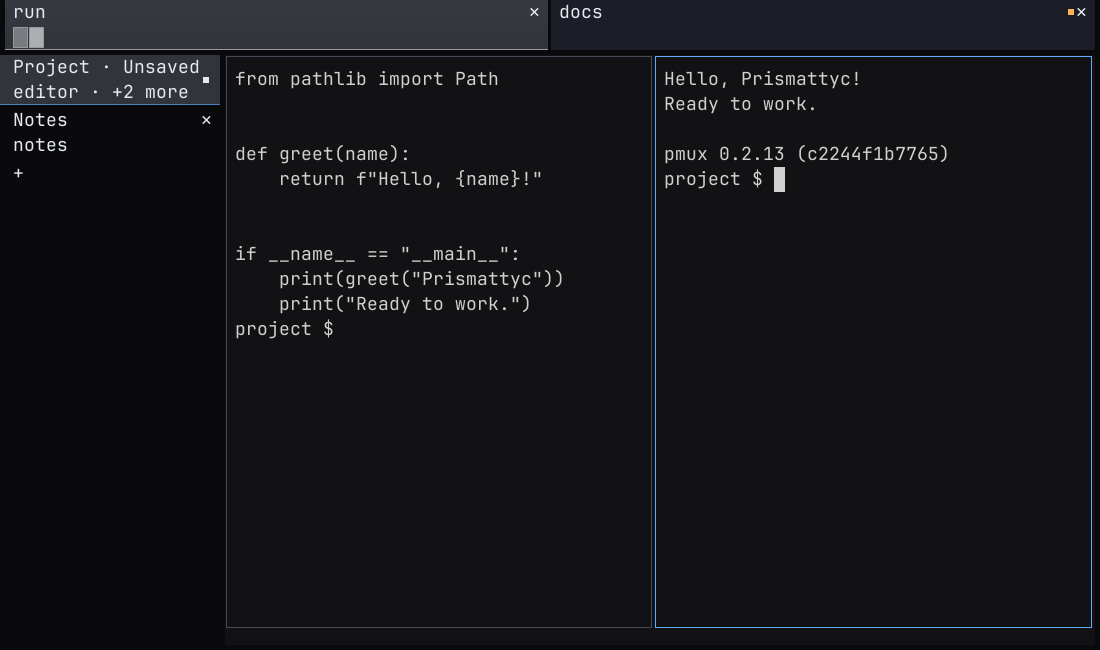
This recording shows Prismattyc 0.3.36. The screenshot above shows an earlier release. Captions and a text transcript are available.
Read the demo transcript
This transcript follows the Prismattyc 0.3.36 demo reel. Saved Spaces restore layouts; they do not preserve running processes across a computer restart.
This is Prismattyc, version 0.3.36. A splash screen, then your first terminal, with crisp text, true color, and emoji. Switching themes takes one keystroke. Spaces keep projects apart.
Create one, add a tab, and move between sessions from the sidebar. Split a pane, and pmux lists every session it keeps running. Now the centerpiece. Grok Bot, the orchestrator, sits next to a Grok agent and a Claude agent, each in its own sample repo.
With pmux pane write, Grok Bot types a task into each agent's pane, then submits it. We fast-forward the thinking. Mid-task, Grok Bot steers Claude. Both agents report back over pmux mail, and Grok Bot collects the results.
To install, grab the Mac DMG, the Linux packages, or the Windows MSI or zip from the release page. Or start at prismattyc.com.
Provenance
Built on familiar terminal tools.
Prismattyc runs shells and command-line programs in a desktop window. It builds on the terminal conventions those programs already use.
1960s
TTY: the teletypewriter
Unix was first operated from teleprinters. The hardware is gone; the name stayed as the terminal abstraction: line discipline, echo, job control.
1978
VT100: the video terminal
The VT100 helped establish escape-sequence conventions that terminal applications still use. Modern terminals extend those conventions with color, mouse input, and more.
2026
Prismattyc: your workspace
Run familiar command-line tools in tabs and panes. Organize sessions into Spaces and manage them from the window or with pmux.
Capabilities
Work across terminals and projects.
Use the desktop application for daily work. Use pmux to manage sessions and agent messages from a terminal or script.
pmux mail
Agent mail, built in
Named agent sessions can send and receive messages through pmux mail. Open Agent Messages in the command palette to find a session and view its queue status.
pmux attach
Detach & reattach
Shells and programs keep running when you detach, while pmuxd stays running. Reconnect to the session when you are ready.
pmux space
Spaces & layouts
Group sessions into named Spaces and save their layouts. Reopen a Space from the side rail. Saved layouts do not preserve running processes across a computer restart.
Ctrl+Shift+F
Scrollback & find
Scroll through terminal history, search for text, and copy a selection. Open Find with Ctrl+Shift+F in the desktop application.
prismattyc-host
Windowed host
Open tabs and split panes in a desktop window. Use the command palette, zoom a pane, paste images, and adjust fonts, colors, and window appearance.
TERM=prismattyc-kitty
Terminal compatibility
Bundled terminfo describes the terminal to command-line programs. Prismattyc supports truecolor output and configurable keyboard shortcuts.
Enabled by default
Keyboard and screen-reader support
The desktop application exposes tabs, pane names, focused terminal text, selections, and dialog controls to the operating system through AccessKit. Keyboard navigation and live announcements are available now. You can turn announcements off without disabling the accessibility tree. Read the accessibility guide.
Install
Get the binary
Download for Linux x86_64 or ARM64. Binaries run on Linux with glibc 2.28 or newer (Arch, Fedora, Debian bookworm+, Ubuntu 22.04+, and other current distributions). Prismattyc is developed and tested on macOS, Linux and Windows. A universal macOS build for Apple Silicon and Intel is available, signed with Apple Developer ID and notarized by Apple. Windows x64 is supported too, with builds signed by Moonbase 2090 LLC.
choose an available platform
Extract the Linux archive and run ./install.sh. On macOS, open the disk image and move Prismattyc.app to Applications. On Windows, run the MSI, which adds pmux to your user PATH (open a new terminal afterwards), or extract the portable zip and run bin\prismattyc-host.exe. The Windows build is signed but new, so if SmartScreen warns, click More info, then Run anyway. Checksums are published with each release on GitHub Releases. Use the update and uninstall guide for the built-in updater and removal options.
$ git clone https://github.com/moonbase2090/prismattyc.git
$ cd prismattyc
$ cargo install --path crates/prismattyc-mux --bins --locked
$ cargo install --path crates/prismattyc-host --locked
$ cargo install --path crates/pmux-mcp --locked
$ cargo install --path crates/prismattyc --locked
$ prismattyc-host
Install Rust 1.90 or newer and the required system libraries first. See the source build instructions.
Independent systems / The maker
Moonbase2090
Moonbase2090 builds Prismattyc. The source is available under the MIT License, copyright Moonbase 2090 LLC.